Before entering the terminal, you must meet all of the following requirements.
Safety Induction
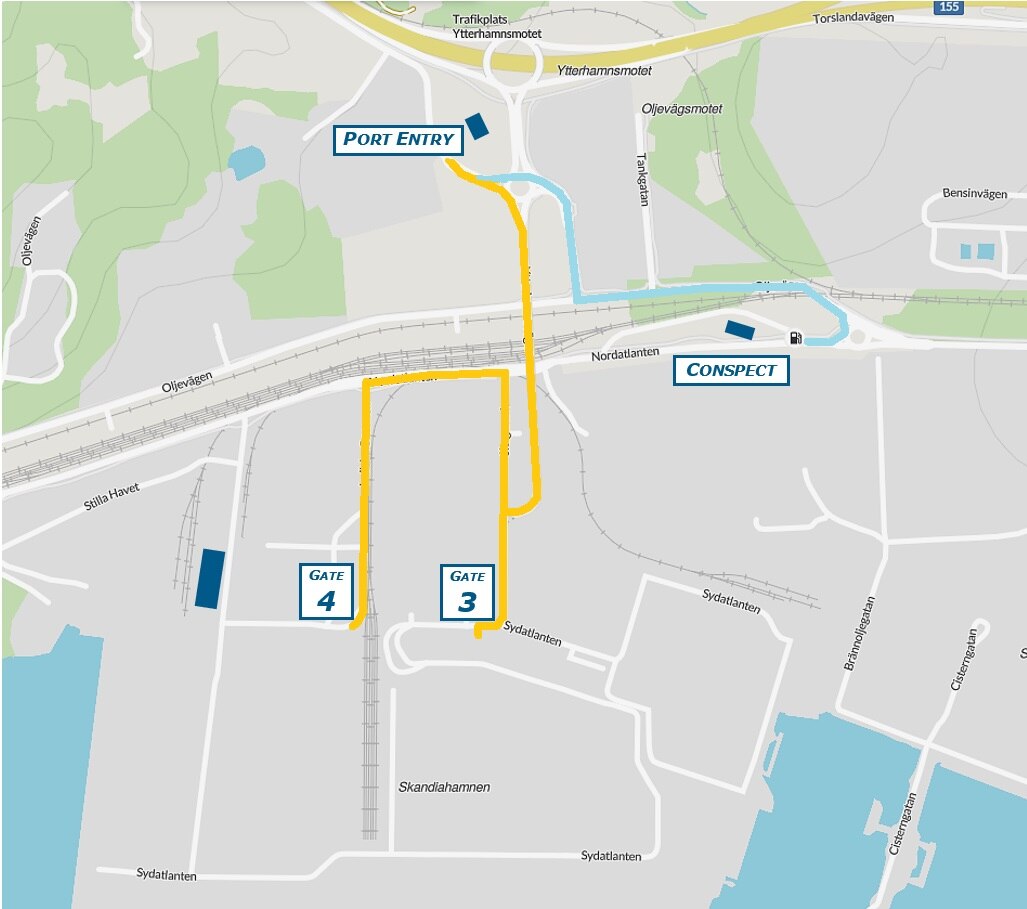
Everyone visiting APM Terminals Gothenburg must complete the safety induction before entering the terminal. The course is available in Swedish or English and takes about 15-20 minutes to complete. You can complete this digitally or at Port Entry (see map).
Pass card/PIN-code
To enter the terminal, you need a valid pass card or temporary PIN code. At Port Entry you can apply for and collect your pass card, or a temporary PIN-code. Both pass card and PIN-code requires completed Safety Induction and a valid photo ID. PIN-codes are active for eight hours, thereafter you must go to Port Entry to renew it.. Learn more about Terminal Passcards and download an application form.
Visit code
Drivers dropping off or picking up containers at the terminal need a confirmed visit code, which contains information about your appointment. The visit code is provided by your trucking company.
Safety clothing
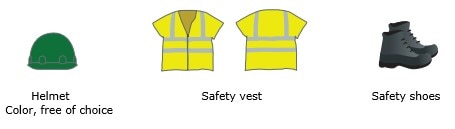
Safety is our top priority. Everyone entering the production area must fulfil the following PPE requirements for his or her own safety. This includes safety helmet, safety vest, and safety shoes.
• High-visibility clothing: Must have continuous reflective bands visible from all sides. Minimum EN ISO 20471 Class 2. Small reflective details only are not accepted.
• Helmet: Only approved industrial helmets (EN397 or equivalent) are allowed. “Cap helmets” are not permitted.
Drivers without correct PPE will be asked to use approved equipment. Repeated non-compliance may result in denied entry.
Drivers entering the terminal are required to proceed with the check-in process without delay. Upon arrival, the driver must use their access card or PIN code to initiate the terminal procedure.
Taking breaks or remaining idle within the terminal grid area is not permitted. Drivers should ensure they are prepared to continue the process immediately upon arrival.
This is necessary to maintain efficient terminal operations and to avoid unnecessary delays for other drivers awaiting service.
At the security checkpoints, gates, and grids, it is possible to contact Avarn by intercom for assistance. It is recommended to utilize their guidance on your first visit to the terminal.
Trucks arriving at the terminal must be equipped with chassis that can be securely locked at all four corners using twist locks.
Other chassis types are not permitted, and drivers with non-compliant equipment may be denied service.
This policy is in place to ensure safety and efficient operations at the terminal.
Please watch the short film below to familiarise yourself with how our new self-service gates operate.
Screens outside the gate show drivers how long we estimate that the assignment inside the terminal will take.
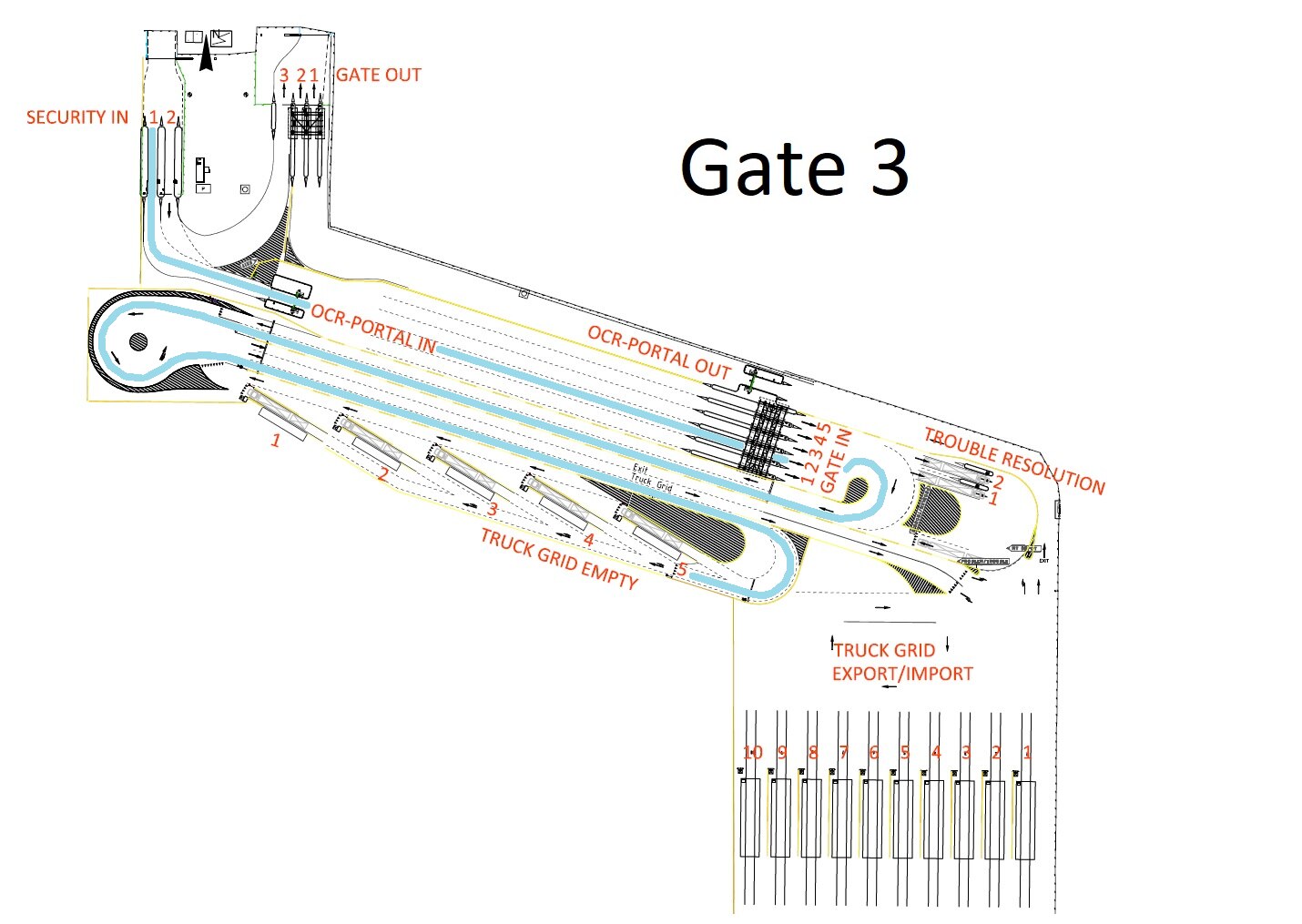
All empty units for depot are delivered/picked up in Gate 3 (see map). Before delivery, empty units must be inspected at Conspect (see map).
Security In
Swipe your card/enter PIN-code to open the gate. Confirm your truck´s license number.
OCR In
Drive at constant speed through portal. The OCR will provide container number, ISO-type and placards to gate clerk.
Gate In Select the lane applicable to your visit. Swipe your card or enter your PIN-code, enter the visit code and confirm details. Follow the instructions on the screen. If problems occur, please contact the gate clerk through the intercom next to the screen.
Reach Stacker Grid Proceed to an empty grid lane, turn off the engine and unlock the twistlocks. For safe handling in the grid and to ensure that you are seen and safe, move clockwise around the truck in the pattern shown in the image.
When it is safe to load/unload, enter the booth and swipe your card or enter your PIN-code to start the job. Once the job has been initiated, you must remain in the booth.
Press the green button when the reach stacker approaches to indicate that you and your chassi are ready. Continue pressing the button until the reach stacker has completed the lift and driven away.
It is not permitted to leave the orange zone when the reach stacker is operating on your chassi.
OCR Out: Drive at constant speed through the portal.
Gate Out: Swipe your card/enter PIN-code.
Loaded containers are delivered/picked up in either Gate 3 or Gate 4. The correct gate is specified on the visit code.
Security In
Swipe your card/enter PIN-code to open the gate. Confirm your truck´s license number.
OCR In
Drive at constant speed through the portal. The OCR will provide container number, ISO-type and placards to gate clerk.
Gate In
Select the lane applicable to your visit. Swipe your card or enter your PIN-code, enter the visit code and confirm details. Follow the instructions on the screen. If problems occur, please contact the gate clerk through the intercom next to the screen.
OOG
If you are delivering out of gauge cargo, use the designated OOG-lane when arriving at Gate 4. The OOG-lane is located next to the two regular ingate lanes.
Stop in front of the boom and enter the kiosk to contact the gate clerks. Once they open the boom, proceed to the designated area next to the OCR portal. Do not drive through the portal.
The gate clerks will measure your cargo and provide further instructions.
If your cargo exceeds 200mm over-width on either or both sides or 2100 mm over-height, you will be instructed to deliver the cargo in the area that is located behind the “blue tent” instead of the grid.
Straddle Carrier Grid
Proceed to and reverse into an empty grid lane. Stop in line with the green area, turn off the engine and unlock the twistlocks. For safe handling in the grid and to ensure that you are seen and safe, move clockwise around the truck in the pattern shown in the image.
Be cautious when a SIMA is operating in a lane next to you. It is not allowed to walk next to an operating SIMA.
When it is safe to load/unload, enter the booth and swipe your card or enter your PIN-code to start the job. Once the job has been initiated, you must remain in the green area or in the booth.
Press and hold the green button in the booth when the straddle carrier approaches to indicate that you and your chassi are ready. Continue pressing the button until the straddle carrier has positioned itself over the chassi and has come to a complete stop.
It is not permitted to leave the orange zone when the straddle carrier is moving in your grid lane. It is only allowed to be in the green area when the straddle carrier is positioned over the chassi and is completely still. When the straddle carrier backs away after a completed lift, you must be in the orange zone and press the green light.
SIMA
If you are delivering a unit with a SIMA-chassi, do not swipe your card or enter your pin-code until the container has been discharged. If you are picking up a unit with a SIMA, position the truck in front of the grid to leave room for the straddle carrier.
OCR Out: Drive at constant speed through the portal.
Gate Out: Swipe your card/enter PIN-code. When picking up import units, seal number must be entered at Gate Out.
All container-, flatbed units and similar interlocked piles must be in compliance with ISO standard 668 and normative references including CSC (Convention for safe Containers) with valid ACEP to be handled as such unit according to the ISO standard 3874:6.2 (top lift spreader).
There could be exceptions in cases when combinations of container types, size, load design and operating condition could not be taken into account. Such situations should be specially notified and carefully evaluated by those competent to do so in order to decide whether a safe and satisfactory operation can be assured.
All and non ISO 668 standard units must be able to withstand forces similar to the ISO standard 1496.
If you are driving an electric truck, you will now be able to access the terminal via a ‘Priority Lane’ and you will be given priority within the terminal area.
To utilise this prioritization offer, please follow the instructions below.
1. The driver drives in via Gate 4, in the far-right lane. Follow the green Electric Truck Priority sign.
2. The driver continues along the standard route and follows the green priority markings displayed on the roadway.
3. Upon reaching the designated area, the driver reverses the vehicle in an available parking grid and swipes their access card. The electric truck will then be assigned priority handling.
4. The driver continues straight in the lane, then follow the direction for electric trucks.
5. The driver backs into a free square and swipes the card. The electric truck will be assigned priority handling here.
6. Once the handling is complete, the driver drives out as usual. The electric truck driver contacts Avarn on the gate phone at Gate Out and they will open the boom.
 Select the lane applicable to your visit. Swipe your card or enter your PIN-code, enter the visit code and confirm details. Follow the instructions on the screen. If problems occur, please contact the gate clerk through the intercom next to the screen.